
Interspire Email Marketer 8.8.0 is available today. It gives you a clearer decision at the start of every campaign: how much, if anything, should this message track?
That decision used to be a pair of open- and click-tracking checkboxes. In 8.8.0, it is a mode. You can set a default for the account, refine it for a list, and choose a different mode for an individual campaign when that audience needs it.
Watch the two-minute release overview:
Tracking is now a mode, not a switch
Each campaign can use one of five modes:
- Off: no pixel and no rewritten links.
- Minimal (date only): records only a contact’s day-level last-opened date; no open history, IP or device data, or click tracking.
- Aggregate (anonymous): uses an identical pixel for the campaign and records campaign-level totals, not activity tied to individual recipients.
- Individual (consented): records per-recipient activity only for people who agreed; everyone else receives an untracked message.
- Individual: the familiar per-recipient tracking behaviour.
Existing campaigns, autoresponders, triggers and lists keep the behaviour they had before the upgrade. The default remains Individual for the same reason: IEM does not silently change a sender’s reporting or delivery behaviour. You decide whether a different default fits a particular audience.
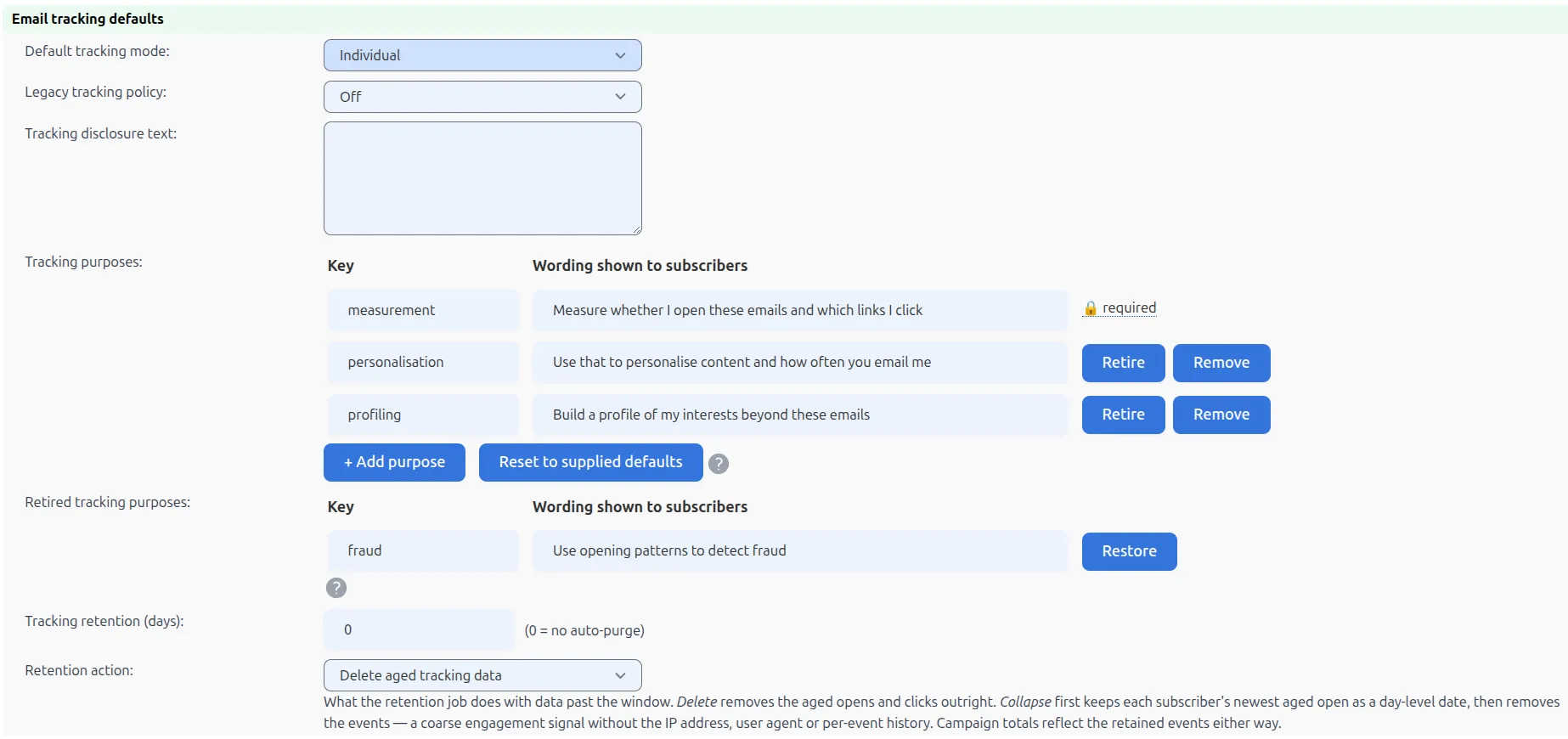
For the detail behind each option , including what reports show in each mode : see the Email Tracking Modes guide.
A preference link that reaches mail already in the inbox
The new %%trackingpreferencelink%% merge tag gives recipients a way to stop tracking without unsubscribing from your email. Their choice applies across the lists they hold with you, and IEM removes the open and click history you already hold for them.
It also applies when an old email is opened or clicked. A tracking URL can expire, but an expiry window was never an opt-out: during its lifetime, it could still record activity. In 8.8.0, a recipient who has withdrawn is no longer measured when they use a link or open a message already in their inbox. The destination link still works; the measurement does not.
Consent changes are recorded in an audit log. You can also set a retention window for older tracking data, either deleting it or reducing it to a day-level engagement signal without the event history, IP address or user-agent data.
These controls were built with the Italian Garante’s April 2026 tracking-pixel guidelines and the wider ePrivacy consent regime in mind. Minimal (date only) also reflects the CNIL’s position in France.
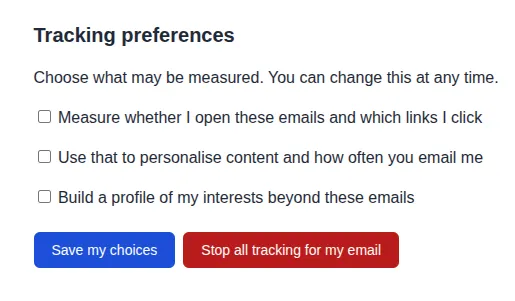
Interspire provides tools to control email tracking. It makes no representation that any configuration satisfies the Italian guidelines, GDPR, ePrivacy, or any other law. The instance owner is the data controller and is responsible for enabling and configuring these controls, for the disclosure text shown to recipients, and for obtaining their own legal advice.
A built-in Image Manager
8.8.0 replaces the older FileManager with IEM’s built-in Image Manager. When you choose an image in the editor, you see the images for the campaign or template you are editing, with a switch to your personal gallery. Uploading, renaming, deleting, sorting and paging all stay within that scope.
The release also improves day-to-day editing. Emails from the block editor no longer force horizontal scrolling on phones; heading, font and colour controls work reliably on text that has been through the Text panel.
Stronger XML API tokens
If your installation uses the XML API, regenerate every token after upgrading. Tokens made in 8.8.0 are stronger. Existing tokens continue to work, so integrations do not break during the upgrade.
Go to Users, edit the relevant user, select Regenerate token, and copy the value when it appears. It is shown once and becomes live immediately.
Also in this release
- The Date header is stamped per message rather than once per send run.
- Click-to-open rate is calculated against unique openers, and bot opens are filtered before unique counts are calculated.
- Bounce testing on a list no longer falls back to the system password.
- A new trigger action can set a contact custom field when the trigger fires.
- Addons can register email editors through a simpler integration mechanism.
Read the full changelog for the complete list.
Two things to do after upgrading
- Review Settings → Email settings → Email tracking defaults, then check the settings on any lists that need a different approach.
- If you use the XML API, regenerate the tokens used by each integration and update the integration with the newly copied value.
For the operational details, see the 8.8.0 upgrade notes.