

Email Tracking Modes and Consent
Interspire Email Marketer 8.8.0 replaces the old pair of open/click tracking checkboxes with a tracking mode chosen per campaign, inherited from list, user and account defaults. This page covers what the modes do and how to configure them.
Interspire provides tools to control email tracking. It makes no representation that any configuration satisfies the Italian guidelines, the CNIL recommendation, GDPR, ePrivacy or any other law. The instance owner is the data controller and is responsible for enabling and configuring these controls, for the disclosure text shown to recipients, and for obtaining their own legal advice.
Why the modes exist
The Italian Garante’s guidance and the French CNIL recommendation discuss email tracking pixels. IEM provides different ways to collect, limit or turn off tracking, plus controls for recording preferences and withdrawing tracking. This guide describes those product controls; it does not decide which guidance applies to a mailing or whether a configuration meets it.
The five tracking modes
| Mode | Recipient receives | Data stored |
|---|---|---|
| Off | No pixel, no redirect links | Nothing |
| Minimal (date only) | A recipient-specific pixel | One last-open date per contact, overwritten each time. No clicks or event history |
| Aggregate (anonymous) | A pixel identical for every recipient of the campaign | Campaign counters only. No per-contact row, no IP address, no device |
| Individual (consented) | Tracking is governed by recorded choices and the legacy tracking policy | Per-recipient activity where those settings permit it |
| Individual | Per-recipient tracking without checking IEM’s recorded consent before send | Per-recipient open and click records |
Minimal (date only) keeps a single last-opened date per contact, at day level, and no open history, time of day, IP address, device information or click tracking. Its pixel still identifies the recipient so IEM knows whose date to update. Do not use Minimal as a substitute for anonymous campaign-wide counting.
Aggregate (anonymous) produces campaign-level open and click totals without per-recipient records. Every recipient of a campaign receives the same pixel. Unique counts and per-recipient drill-downs are not available. Because the pixel has no recipient identifier, IEM cannot associate a later load of an already delivered aggregate pixel with an individual withdrawal.
Individual (consented) checks the recipient’s recorded tracking choices. Contacts without a recorded choice are legacy and follow the legacy policy you select: Off leaves them untracked, while Transitional continues tracking them with a notice and preference link.
The selected mode controls the campaign, while the Advanced open and click settings choose which channels to measure. Minimal never tracks clicks and Off tracks neither. Under Individual (consented), recipients in one campaign can receive tracked or untracked messages according to their recorded choices and the legacy policy.
Prerequisites
Database upgrade
Upgrade to 8.8.0 the usual way. The database upgrade adds everything the new modes need. There is no manual step.
Cron
Confirm your usual cron is running. IEM attempts to remove a contact’s tracking history immediately when they withdraw. The Tracking Consent & Retention Cleanup task retries any withdrawal purge that did not finish and, if you set a retention window, removes or collapses older events. Leave this task enabled daily when you use consent modes. The default retention window of 0 disables age-based cleanup, not the withdrawal backstop.
Tracking key (Aggregate mode only)
Aggregate mode signs its campaign token with SENDSTUDIO_TRACKING_KEY in admin/includes/config.php. Without the key:
- the mode selector does not offer Aggregate (anonymous);
- a split test explicitly configured for aggregate refuses to send rather than falling back to per-recipient tracking.
See Token-Based Tracking Links for how to generate and set the key.
What upgrading changes
The 8.8.0 upgrade applies the database changes automatically. It preserves existing tracking behavior and statistics rather than switching existing mailings to a new approach. The account default remains Individual until you change it.
Adopting Aggregate or Individual (consented) is an explicit decision you make per account, user, list or campaign.
Account settings
Go to Settings → Email settings → Email tracking defaults.
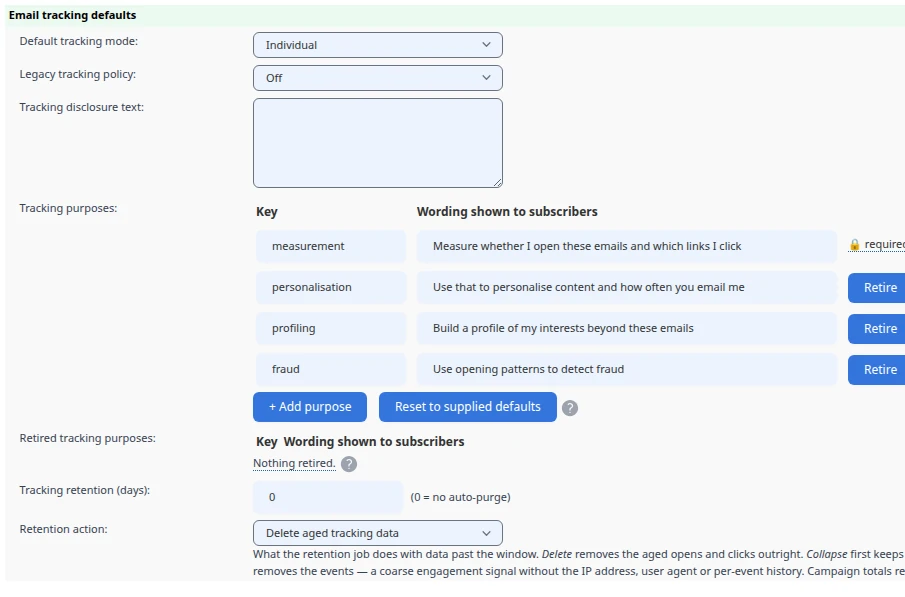
| Setting | Purpose |
|---|---|
| Default tracking mode | The account-wide starting point for new lists and campaigns. |
| Legacy tracking policy | How to treat contacts who predate consent capture. Off means do not track them. Transitional means track them but append a notice carrying a one-click “stop tracking” link. |
| Tracking disclosure text | The wording shown on subscribe forms and the preference page. This is your privacy notice, in your words. |
| Tracking purposes | What you are asking permission for. One row per purpose; each becomes a separate control on your subscribe forms and preference page. See Tracking purposes below. |
| Retired tracking purposes | Wording for purposes you no longer ask about, kept so that older consent records stay readable. A retired purpose is never offered for new consent. |
| Tracking retention (days) | 0 turns off age-based event cleanup. A positive number lets the scheduled task act on older opens and clicks. Withdrawal is handled separately. |
| Retention action | What happens to data past the window. Delete removes the aged opens and clicks. Collapse keeps each contact’s most recent aged open as a day-level date and then removes the events, leaving a coarse engagement signal without the IP address, device or per-event history. |
The shipped disclosure is a placeholder. Replace it with wording that describes your own tracking practices. IEM does not assess that wording.
Tracking purposes
IEM ships four editable purposes as a starting point: measurement, personalisation, profiling and fraud detection. Use wording that describes what you actually do.
Each active purpose appears as a separate control on forms that collect tracking choices and on the preference page. Measurement decides whether per-recipient tracking activity is recorded at all. Withdrawing measurement removes existing open and click history and the Minimal last-open date; withdrawing another purpose restricts subsequent use of the data rather than deleting the activity records.
Review the purposes before displaying them to subscribers. Every active purpose adds another choice they must read.
Editing the list
Purposes are edited as a table, one row each:
| Column | Meaning |
|---|---|
| Key | The stable identifier written to every consent record. Lowercase letters, digits and underscores, up to 30 characters. |
| Wording shown to subscribers | The exact sentence rendered beside the checkbox on your forms and preference page. Up to 500 characters. |
+ Add purpose appends a row; leave the key blank and it is derived from the wording. Reset to supplied defaults restores the four shipped purposes. Retire moves a row to the retired table below, where Restore brings it back. Remove deletes it outright.
The measurement purpose is locked: it is always present, always first, and cannot be retired or removed. It is the one that decides whether anything is recorded at all.
Rows are validated when you save. A bad key, a duplicate, or wording over 500 characters refuses the save and names the offending row. A purposes error also blocks saving the other Settings tabs until you fix it.
User settings
New in 8.8.0Each user account carries its own tracking defaults, applying to every list that user owns. Go to Users → Edit → Email settings:
- Email tracking default — the mode this user’s lists inherit.
- Legacy tracking policy —
OfforTransitionalfor this user’s pre-existing contacts.
Both default to Account default, which inherits from Settings and is what every existing user has after upgrading.
Administrators set these on a user’s Email settings tab; a user editing their own account does not see them. Use this when different list owners need different defaults without opening Settings.
How defaults resolve
A list’s effective default is resolved in three steps, first match wins:
- The list’s own setting, if it is not Account default.
- The list owner’s user default, if that is not Account default.
- The account setting, under Settings → Email settings.
Campaign sends, the XML API, autoresponders, triggers and subscribe forms all use this same resolution.
The list edit form shows you the outcome. While Account default is selected, the form prints what it currently resolves to and which tier it came from, for example:
“Account default” currently resolves to Individual (consented) (from the list owner’s user default).
Lists keep any explicit legacy policy after upgrading. Select Account default on a list if you want it to inherit from the user and account defaults.
List settings
Edit a contact list to override the account and user defaults for that audience:
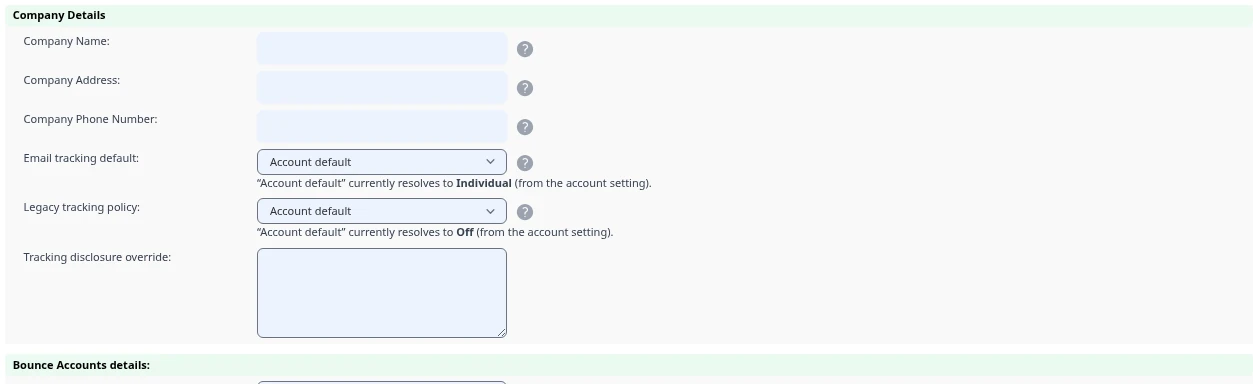
- Email tracking default — the mode campaigns to this list inherit.
- Legacy tracking policy —
OfforTransitionalfor this list’s pre-existing contacts. - Tracking disclosure override — list-specific disclosure wording.
This lets you set different tracking defaults for different audiences without changing the account default. IEM does not determine which regulatory guidance applies to a list.
Lists act as a floor. A list set to Individual (consented) prevents unconditional Individual tracking for sends to that list. Campaigns and autoresponders selecting Individual use Individual (consented) instead. Trigger emails apply the restriction across the lists they can send to. Split tests do not support Individual (consented), so use a supported mode such as Aggregate where that list restriction applies.
Campaign settings
The tracking mode selector appears when you set up a send, and on autoresponders, trigger email actions, and split tests. A campaign inherits its list’s default unless you change it.
Within a mode, the Advanced opens and clicks controls choose which channels to measure. Turning click tracking off leaves links unmodified. Minimal never tracks clicks, and Off tracks neither channel.
Capturing consent
When you use Individual (consented):
- Subscribe forms can present tracking choices using the disclosure and purpose wording you set. Review the forms you use, including older embedded copies, to confirm what they display.
- Import and API contacts arriving without an explicit tracking choice are treated as legacy, neither allowed nor denied, and follow the legacy tracking policy.
- The preference page lets an existing contact grant or withdraw at any time.
Choices are recorded per membership (the contact on a given list) and purpose, and every change is written to an audit log with the actor and timestamp.
The subscriber preference page
Place the %%trackingpreferencelink%% merge tag in your email templates. It renders a personal link to a preference page where the recipient can stop tracking without unsubscribing.
The page shows one control per active tracking purpose, matching the controls on your subscribe forms, plus a single “stop all tracking” option for anyone who does not want to read the detail.
If a recipient is tracked under the Transitional legacy policy and the tag is absent, IEM appends a short notice with the link. Place the tag yourself so its position and surrounding wording suit your message.
When someone stops tracking:
- a stop all tracking choice applies across the email address’s lists belonging to the same list owner;
- IEM attempts to delete existing open and click records and the Minimal last-open date immediately, then recomputes affected campaign counters; the daily cleanup task retries a purge that did not finish;
- the consent record and audit log entry are kept — they are the evidence of the choice;
- email delivery is unaffected; they remain subscribed.
Re-consent is affirmative and per-list: granting again on one list does not silently re-enable tracking everywhere.
Already-delivered email
Messages sent before a withdrawal may still contain valid tracking URLs. IEM checks the current choice when an open or click arrives and does not write a new tracking event after withdrawal. A valid click link still redirects to its destination. URL expiry is separate from the recipient’s choice.
Retention
Set Tracking retention (days) to a positive number and the scheduled task will act on open and click events older than that window, then recompute the affected campaign counters. Retention action decides what “act on” means: Delete discards them, Collapse first keeps each contact’s most recent aged open as a day-level date and then discards the events. Collapse is the middle ground — you keep knowing roughly when someone last engaged, without keeping their IP address, device, time of day or per-event history.
The default is 0, which disables age-based event cleanup. This window does not age out the single last-open date kept by Minimal, and withdrawal is handled separately.
Withdrawal triggers an immediate purge attempt regardless of the retention window. The daily cleanup task is its backstop, so leave it enabled when using consent modes. A denied contact is not summarised into a last-open date instead of being deleted.
What your reports will show
- Aggregate campaigns report bot-excluded totals only. Unique opens and clicks show as “not available” and per-recipient drill-downs are empty, because nothing was stored against individual contacts.
- Split tests in aggregate mode still pick a winner, ranked on bot-excluded totals; comparison tables and CSV exports label the figures as aggregate.
- Autoresponders and triggers whose mode changed report the sum across the periods before and after the change. Unique metrics show as “not available” across a mixed history.
- Minimal campaigns contribute to a contact’s last-opened date and nothing else. There are no open or click reports for them.
- Individual-mode history is time-bounded where a retention window applies, and the stats screens say so.
The has opened and has not opened filters in segments and contact search understand day-level data, so a contact whose events were collapsed by retention, or who was only ever tracked in Minimal mode, still reads correctly.
Points to review yourself
The Transitional policy does not expire automatically. Contacts without a recorded choice continue to be tracked with a notice and preference link until you change the policy or they make a choice. Review this setting deliberately; IEM does not decide when to end it.
The post-upgrade default is Individual. That preserves existing tracking behavior; it is not a recommendation for a particular audience. Review account, user and list defaults before your next send.
Minimal is still per recipient. Its pixel identifies whose last-opened date to update. Do not use it as a substitute for Aggregate’s anonymous campaign totals. IEM does not determine what rules apply to a send.
Your disclosure text is yours. The configurable field lets you supply the wording recipients see. IEM does not write or assess that wording for you.
For the authorities’ own texts, see the Garante’s guidance and the CNIL recommendation. Obtain your own advice about whether and how either applies to your mailings.